


You're standing in line at the pharmacy waiting to pick up your prescription, but the pharmacist continues to stare at their computer screen. Then, they will ask to see your insurance card...again. The pharmacist types into the computer, shakes their head and tells you that your claim has been denied. Next, they ask if you have a PCN number?
If you are like most people who obtain health insurance through an employer, you'll probably look at your insurance card and see a member ID, group number, etc., but may be wondering "what is pcn on insurance card" and why is it blocking me from getting my medication?
PCN numbers can be a source of frustration for both patients and healthcare providers; they act as gatekeepers between you and your health benefits. In cases where they function properly, you never know they exist. However, when they fail, nothing else seems to work.
Below we will break down exactly what this number is, where to find it, and how to resolve any problems that occur with it.
The Short Answer: What is PCN?
A Processor Control Number (PCN) is a unique alphanumeric code that serves as a secondary routing number for Pharmacy Claims. While the BIN (Bank Identification Number) will direct the electronic claim to the appropriate insurance company, the PCN in the data from the insurance cards will direct the claim to the proper department or business unit at that insurance company.
Here is an analogy to help you better understand how the BIN & PCN work together:
- BIN = Zip Code (Sends the mail to the right City).
- PCN = Street Address (Sends the mail to the right Building).
- Group Number = Apartment number (Sends the mail to your specific apartment number - identifies your Employer/Plan).
If the insurance computer system receives the claim with an incorrect PCN, the claim will be instantly rejected.
The Anatomy of Your Insurance Card
Understanding what is "pcn" on an insurance card requires taking into account the other numbers right next to it. An insurance card can be thought of as a road map. Each series of numbers tell a different piece of information about your health care to a provider.
1. Rx BIN (Bank Identification Number)
The Rx BIN is typically a 6-digit number. Although the term may suggest a relation to banking, it does not. The BIN tells the pharmacy software which Pharmacy Benefit Manager (PBM) will be responsible for paying the claim. Common PBMs are CVS Caremark, Express Scripts and OptumRx.
2. Rx PCN (Processor Control Number)
The Rx PCN is where we have focused. The Rx PCN lets the PBM identify in which process to place your claim. Insurance companies are large and offer thousands of different plans. Some plans cover vision, some cover dental, while some are for government employees and strictly adhere to their own formularies. The Rx PCN allows your claim to be directed to the processor who knows the rules for your specific plan.
3. Rx GRP (Group Number)
The Rx GRP represents the employer or organization that purchased the insurance policy. For example, if you obtain insurance through your job at a technology firm, it is probable that all of your co-workers also have the same Rx GRP.
4. Member ID
This is a unique identifier to you (and possibly your dependents). This identifies the specific policy holder.
When you give your card to a pharmacist, he/she must correctly enter all four of the data points listed above. If the BIN is correct for the PBM, but the PCN is incorrect, then the PBM essentially states, "I see the claim, I just don't know which rule book to use when processing it".
Why Is the PCN So Important for Billing?
Accuracy is king when it comes to medical billing services, and one misplaced character can stop the money flowing.
The PCN serves an additional purpose than submitting a medical claim. Typically, the billing department will submit a claim using the Member ID and Group ID at the point of service when you visit your doctor, but very seldomly do they require a PCN. Medical claims go through a "clearinghouse" which utilizes the Payer ID (a completely different number).
Pharmacy claims operate differently. Pharmacy claims are processed in real-time. When a pharmacist enters a prescription, the pharmacy software system sends a notification to the PBM and is expecting a response back within seconds. The PCN enables instant routing of the data to the correct server for processing the claim.
Consequences of Errors
When what is pcn on insurance card information is incorrect or missing, the system will return a "Hard Denial". A Hard Denial is NOT a request for additional information, but rather a complete denial of the claim.
- For Patients: Pay full price for prescriptions or leave the pharmacy without filling in their prescriptions.
- For Pharmacies: Waste staff time attempting to contact the help desk for assistance.
- For Providers: If a doctor attempts to bill a vaccine through pharmacy benefits and does not have the PCN, they receive no payment.
At Human Medical Billing, we see this problem has an impact on our client’s cash flow daily. For those providers who provide in office dispensing or vaccines, the PCN should be treated with the same respect as the Member ID. As part of our healthcare revenue cycle management services, we concentrate on front end verification to capture errors in the information prior to a claim being submitted.
Where to Find the PCN on Your Card
Locating the necessary codes is typically a search-and-find process as most health insurance providers lack a standard format for their cards.
Examine the Card's Front: As of recent years, many of the newer cards will display pharmacy related information in one corner; commonly located in the lower-right or lower-left corner of the card. You are searching for a grouping of codes marked "Rx".
- RxBIN: 123456
- RxPCN: ADV
- RxGRP: EMP123
Examine the Card's Back: Many carriers place the front side of the card in branding and put the technical information that includes the codes on the back side of the card. Review the small print and look for sections titled "Pharmacist Claims" or "Submit Claims To". The PCN will frequently appear within those areas.
Digital Cards: If you utilize an application for your health insurance, the digital card will typically display the numbers in a much clearer manner than the actual plastic card.
What If There Is No PCN?
As a result of the non-standardized layouts, locating the necessary information can become confusing. When asked what does pcn on insurance card means when you are simply searching for a code, and the card has nothing on it, is the cause of the confusion.
- It may not be required: There are many smaller plans that only require the use of the BIN and Group number. In the case of pharmacy software, the Rx PCN area can either be left blank or populated with a default such as "0000".
- It may be implied: In the case of Tricare (Military Health Insurance) the PCN is frequently implied by the region of service, although a common default for all regions is "A4".
- It may be a Medical Only Card: If you have a card that only covers physician office visits and does not cover pharmacy expenses, it is likely that you will have a separate card for prescription medications.
Medical vs. Pharmacy Benefits: A Critical Distinction
The reason this particular topic causes so many problems for people is due to the separation of Medical and Pharmacy Benefits.
1. Medical Benefits:
- Cover: Doctor visits, surgeries, hospitalizations, and some types of in-office injection.
- Routing: Uses the Payer ID (e.g., 87726).
- PCN Required?: Rarely.
2. Pharmacy Benefits:
- Cover: Prescription medications, insulin, and certain self-administered injectable medications.
- Routing: Uses BIN and PCN.
- PCN Required?: Always.
The separation of Medical and Pharmacy Benefits create inefficiencies for patients. Patients visit clinics for procedures. The front desk clerks take the patient's card and input the patient's medical insurance information. Later, the doctor writes a prescription for a medication, however the pharmacy is unable to fulfill the prescription as they require the pharmacy routing information (BIN/PCN) which may be listed on a separate card that the patient left at home.
Human Medical Billing assists offices with this issue through our medical credentialing services and denial management services. Our team ensures that the front desk personnel know which card to request from the patient based upon the services being provided.
Common Rejection Codes Related to PCN
When something goes wrong, computers give specific reasons. These are “NCPDP Reject Codes.” Whether you’re a health care provider or a curious patient, knowing what those codes mean will help you identify where the issue lies.
- Reject Code 04 (M/I Processor Control Number): This is the most commonly seen. “M/I” represents either Missing or Invalid. What that really means is the pharmacist left that field blank, or he or she typed a PCN code that does not match the BIN (Bank Identification Number).
- Reject Code 01 (M/I BIN): The Bank ID is incorrect. Since PCN depends on BIN, this usually causes problems for both.
- Reject Code 06 (M/I Group ID): Sometimes the PCN is correct, but the group ID is incorrect, and that is all the processor needs to reject the combination.
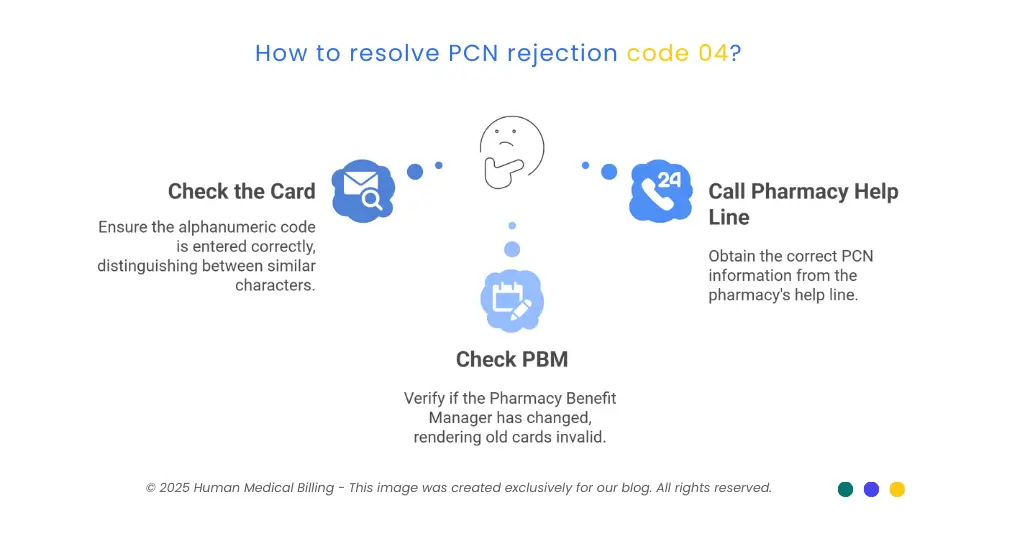
How to Fix Reject Code 04
If you see this message:
- Check the Card: Double check the card’s alphanumeric code. Was there an “O” or a “0”? An “I” or a “1”?
- Check Your PBM: Has your PBM changed recently? (For example, did you switch from Express Scripts to Caremark?) If so, your old cards may no longer be valid.
- Call the Pharmacy Help Line: On the back of each card, there is usually a “Pharmacy Help Line” phone number. The person answering the line should be able to tell you which active PCNs are available for your account.
The Role of AI in Billing and Verification
The way we process claims is changing rapidly. The medical billing industry is now using artificial intelligence (AI) to automate many aspects of processing claims.
Historically, a human would have to read the card and enter the PCN into a computer system by hand. As you might imagine, typing errors were a major problem. Currently, an optical scanner reads the card and enters the information into the fields automatically, thanks to OCR (optical character recognition).
However, while AI has made a big impact, it is far from perfect. For instance, if the card is damaged, or extremely worn, the AI may misread the information. Because of this, human oversight is still critical. At Human Medical Billing, we are combining the best of both worlds by using AI medical billing systems to help us quickly process claims and then using our trained professionals to verify the accuracy of that information. By using a hybrid method like ours, we reduce the number of denied claims and keep medical accounts receivable services running smoothly.
A Step-by-Step Guide for Patients
If you are physically at the pharmacy when your card is not working, here are some tips you should follow:
1. Hand over the physical card:
Do not simply give them the numbers. Show the pharmacist the layout.
2. Acknowledge Denial:
Ask specifically, “Am I receiving a ‘missing PCN’ denial?”
3. Save Yourself a Trip:
Check if you have a different card for prescriptions. Many patients who receive Medicare Part D coverage have two separate cards.
4. Search Online:
Google your insurance company. Type “[Insurance Company Name] pharmacy PCN number”. Sometimes the insurer posts a universal code for that year that can be used for all members.
5. Pay Cash Now and Reimburse Later:
If it is an urgent situation, you may need to pay for the medication but save your receipt. Contact your insurance company after obtaining the correct PCN and file a manual claim form to seek reimbursement for the payment.
Why Providers Must Master the PCN
It may be necessary to understand that "eligibility denials" occur when doctors and clinics do not comply with the requirements of the PCN.
If you write a prescription for a certain drug that needs to go through a specific pharmacy network, but you cannot access information about the pharmacy's benefit (which includes the PCN) then you may send the patient to a pharmacy where they will have no coverage.
Non-compliance with this leads to low patient compliance; patients will leave the pharmacy if they receive a $500 bill due to a mistake made while trying to route them to a pharmacy where they can obtain their medication.
Therefore, we suggest that clinics use our medical coding services and denial management services to establish a comprehensive intake process. Obtain the Medical Card and the Pharmacy Card from your patient during the initial visit. Immediately enter the BIN and PCN in the EMR. These two actions will eliminate numerous phone calls in the future.
Conclusion
Although the question of "what is pcn on insurance card" appears to be technical, the answers can make a huge difference in your health and your financial well-being. It is the bridge between the pharmacy and the insurance company.
Patients should know how to locate the PCN so that they can obtain their prescribed medication. Providers should also capture the PCN to ensure that their reimbursement is processed properly.
Do not allow a three-digit code to prevent you from continuing your healthcare journey. Contact us at Human Medical Billing if you are a provider experiencing difficulty with pharmacy denials or eligibility issues related to the PCN.
FAQ: Quick Answers
PCN stands for Processor Control Number. The PCN is a three-digit code used to direct pharmacy claims to the proper processor.
No, the Group Number indicates your employer or the name of the plan. The PCN indicates the computer system processing the claim.
Yes. You can login to your insurance provider's member portal to display a digital copy of your card and identify the PCN number listed under Rx.
You may only have a medical-only card or your plan may not require a particular PCN. Your pharmacist can attempt to process the claim using the BIN number only.
Generally, no. The hospital processes the claim through the medical portion of your benefits using a Payer ID, not a PCN.
There is no single PCN number for United Healthcare; each plan has a different PCN. Therefore, you must review your individual ID card under the Rx section.
Typically, no. You generally only need to provide the PCN when obtaining your prescription at a pharmacy.

Contact Human Medical Billing to schedule a compliance readiness review or learn more about our end-to-end billing and regulatory support services.